
Summary:
Display Flowchart Note Body on Mobile Main Screen
What’s New
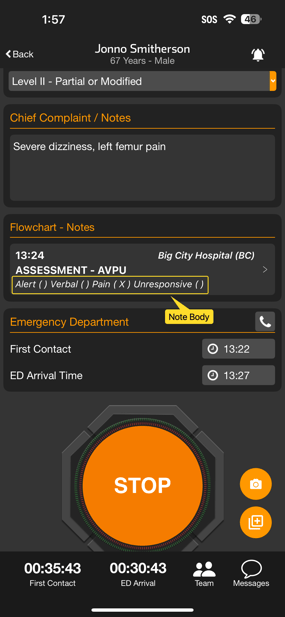
- We have updated display of Flowchart Notes to display the body (content) of the note on the main patient screen
- Formerly, to see the Note Body a tap on the note title was needed to view the complete full flowchart note on a sub-screen opened off of the main patient screen
- Benefits of this change:
- Additional patient information is present right on the main patient screen
- Faster access to information
- Fewer taps
Flowchart Note display prior to version 67 Flowchart Note display in version 68 with body

Who’s impacted
- Teams who use Flowchart Notes in patient channels on Pulsara Mobile for iOS and Android
Timing
-
This change will be in Pulsara Mobile 68, which will become available starting March 4th
Changes to Activate Team Button from Web Patient List
We are updating the Pulsara Web patient list to provide a more intuitive and intentional experience.
What’s New
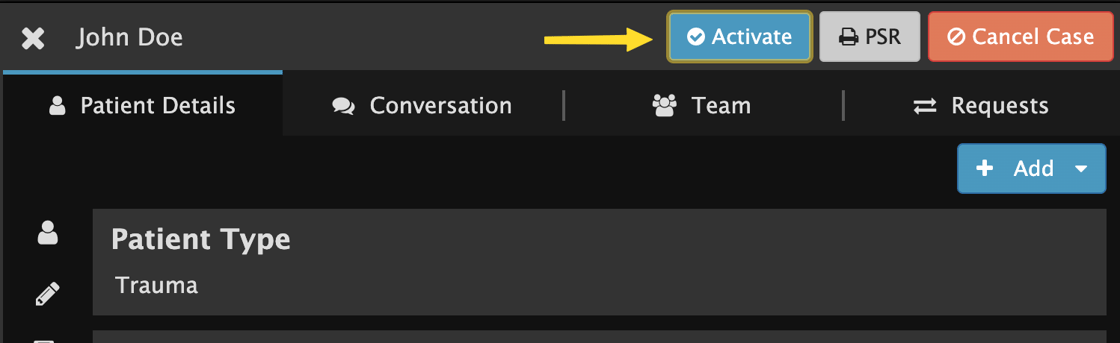
- In an upcoming update, the Activate action will be accessible only through the patient details panel. Removing this option from the Patient List encourages a thorough data review prior to alerting downstream teams.
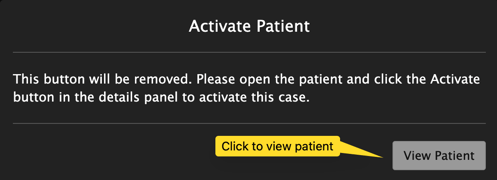
- When the current button is selected a message will appear indicating that the button will be removed and provides a button to view the Patient Details. Selecting the button will navigate you to the Details Panel and highlight the location of the “Activate” button.
Why this change?
- Preventing Accidental Activation: Eliminates unintentional clicks caused by the button's proximity to the EMS Acknowledgement icon.
- Workflow Alignment: Removes confusion for users who don't utilize this activation feature.
- Contextual Decision-Making: Having "Activate" appear exclusively on the Details Panel ensures the action remains alongside relevant patient data, prompting users to review all information before taking action.
-
Summary: We’re making it easier to do the right thing and harder to make a mistake.
Activate Team button

Message after clicking Activate Team
Patient details panel Activate button
Who’s Impacted
-
Pulsara Web customers who activate teams for patient channels
Timing
-
Release Date: This change was released on February 24th.
Updated User Details Screen for Admins
What’s New
-
The Pulsara Web Admin screen used for viewing and updating User Accounts has been updated
-
Information display has been streamlined by grouping related information into tabs
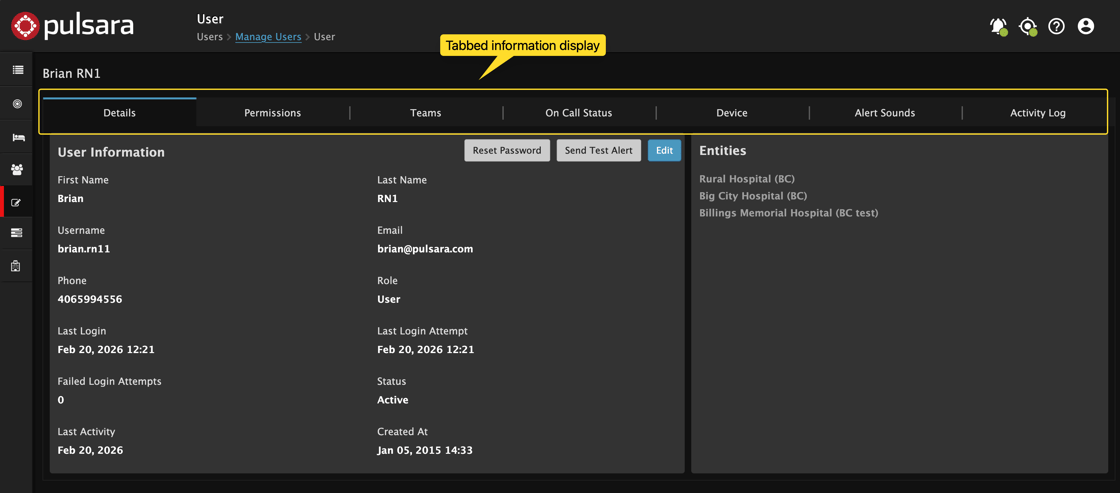
Details such as Name, Username, Email, Phone and approved Entities are visible and editable on the Details screen. Click any of the Device, On Call Status, Update Teams, Activity Log, Permissions tabs to view or update related information.
Who’s Impacted
-
EMS Organization Admins or Facility Admins who view and edit user account details
Timing & Support
-
Release Date: This improvement will be available on March 10.
-
Resources: To learn more about user administration, see this article.
Android Mobile OS Version Support Notice
What’s New
- Pulsara version 69 for Android removes support for devices running Android OS version 13
Who’s Impacted
- Pulsara Mobile users who are using an Android device running OS version 13
- Customers running Pulsara Mobile version 68 will be able to keep running Pulsara for up to 14 months. For full details on Pulsara Mobile version support and related timing, please see this article.
NOTE: Pulsara Android users running OS version 14 or newer will be unaffected by this change.
The Path Forward
- You can continue running Pulsara version 68 for Android until May 2027
- If you want to be able to install new Pulsara for Android versions, you have the following options:
- If your device allows, upgrade to a newer OS version.
- If your device does not allow an OS upgrade, you will need to obtain a different device that runs newer Android operating system versions
Timing
-
Release Date: This change will be released in Pulsara for Android 69 on March 25th.