
Summary
Near Real Time ETA Visibility for EMS
Who's impacted
-
EMS mobile users transporting to a destination facility with Automatic ETA Updates enabled.
What's New
- We have introduced Live Updates to provide continuous visibility into patient transport progress. This feature allows EMS clinicians to monitor automatically calculated ETA information without needing to keep the Pulsara app in view. The feature helps EMS users see what ETA information is being automatically calculated for their current transport.
How to view Live ETA Update information
-
iOS Lock Screen: View the ETA, destination hospital, remaining time, and an animated ambulance timeline directly on your lock screen.
-
iOS Status Bar (Dynamic Island): When your device is unlocked, remaining time in the current transport appears in the status bar at the top of your screen. Tap or long-press this area to see the current arrival timeline.
-
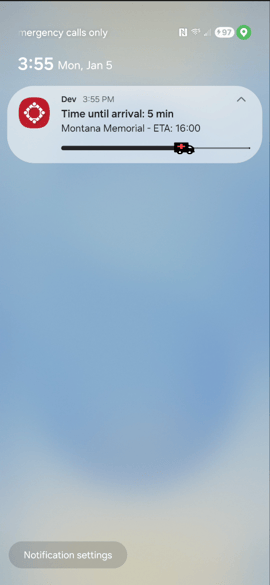
Android Notifications: Pull down the notification shade to view the Time until arrival. Tap the notification to expand the transport progress view.
iOS Live Update Display Android Live Update Display

Technical Requirements & Timing
-
Mobile OS: requires iOS 17 or Android 16 (or newer).
-
Release Date: Available in Pulsara Mobile 66, scheduled for release on January 14th.
-
Resources: For more details about Automatic ETA Updates in Pulsara, see this article.
New Manage Users Screen and Bulk User Management
Who’s Impacted
- Pulsara Admins managing user accounts and permissions
- Facility Admins managing multiple organizations or specific team access
Manage Users Redesign
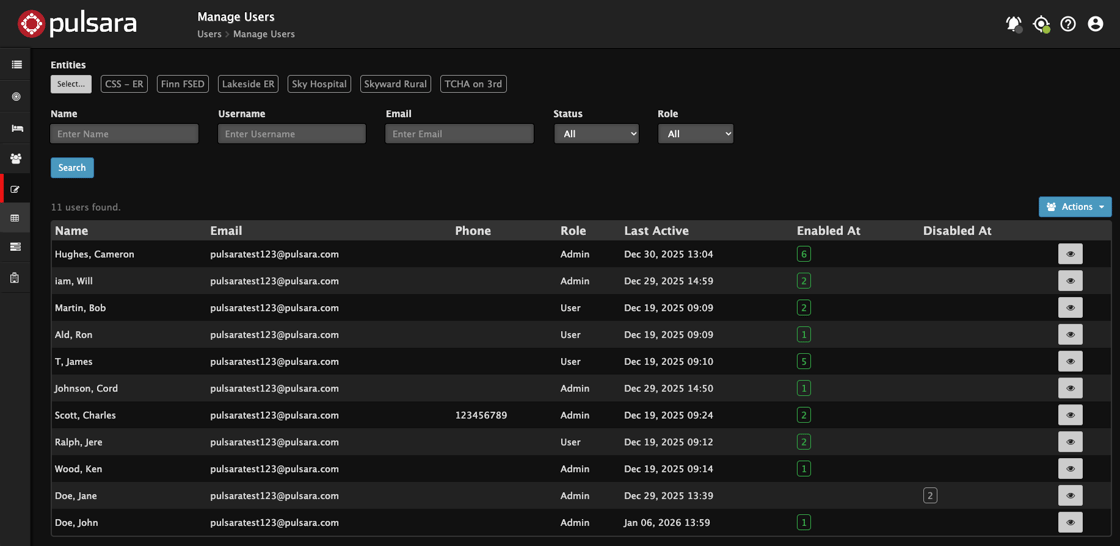
The Manage Users administrative screen has been significantly updated to streamline account oversight and navigation.
-
Interface improvements: A more intuitive search interface and clearer result lists make it easier to identify and manage specific user accounts
-
Direct Editing: Click the “eye” icon on the right side of any row to view or edit a user account.
-
Multi-Facility Filtering: Admins managing several facilities can now filter searches to specific organizations.
-
Seamless Navigation: Use the new Manage Users breadcrumb link at the top of the screen to quickly return to the main listing.
New Manage Users Screen
New Bulk User Management
Admins can now perform high-volume tasks more efficiently. From the search results, click the Actions button to do:
-
Bulk Team Assignment: Add multiple users to specific teams across your facilities (Facility Admins only).
-
Bulk Status Updates: Enable or disable multiple user accounts in a single action.
-
IdP Cross-Facility Provisioning: For organizations using an external Identity Provider (IdP), multi-facility admins can now seamlessly provision and manage user access across multiple facilities.
Actions available to edit multiple users
.jpg?upscale=true&upscale=true&width=270&height=187&name=Action%20List%20(428x297).jpg)
.jpg?upscale=true&upscale=true&width=271&height=188&name=select%20entites%20(427x297).jpg)
Timing & Support
-
Release Date: These administrative enhancements will be live on January 13th.
-
Resources: To learn more about updated admin workflows, see this article.