
Update Summary:
Removal of Mobile Audio/ECG/Image Buttons
Who’s impacted
-
Anyone who uses Pulsara Mobile on iOS or Android to create patient channels
What’s New
-
We removed the Audio, Images, ECG buttons from the mobile new patient screen
-
Removal of the buttons streamlines patient creation by removing redundant items from the screen
A Little History….
-
The Audio, Images, ECG buttons used to be located at the bottom of the Patient section and were visible only when creating a patient
-
When we added the mobile attachment gallery in Mobile version 63 (September, 2025), we added helper messages that appeared when tapping any of the Audio, Images, ECG buttons, indicating the new way to add these items going forward.
-
The helper messages have been in place for 4 months and have been training mobile users on the “new way” to add attachments
How to Add Attachments Going Forward:
-
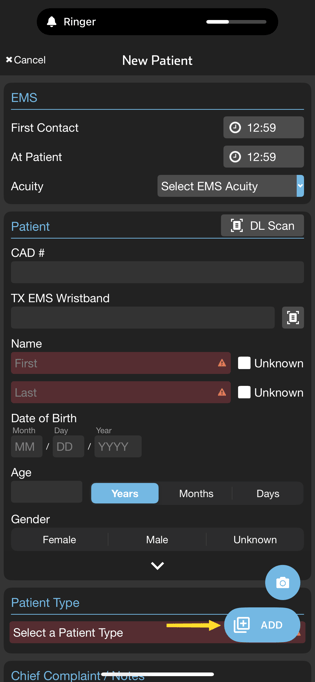
Use the Camera or +ADD buttons at the lower right area of the screen
-
Image: Tap the Camera button
-
ECG: Tap the +Add button and select “ECG”
-
Audio: Tap the +Add button and select “Audio Clip”
-
Tap Camera button to Add Images Tap +ADD button to add ECGs or Audio Clips

Timing & Support
-
This change will be in Pulsara Mobile 67 which will become available starting February 4th
Updated User Export for Admins
Who’s Impacted
-
EMS Organization Admins or Facility Admins who need to export a list of users
What’s New
-
The User Tabular admin screen has been removed and replaced with a new export function located on the Manage Users screen
-
The new export functionality benefits from the improved search capabilities in Manage Users. Simply apply filters, find the set of users you want, then click the Export button
Export Button on Manage Users screen
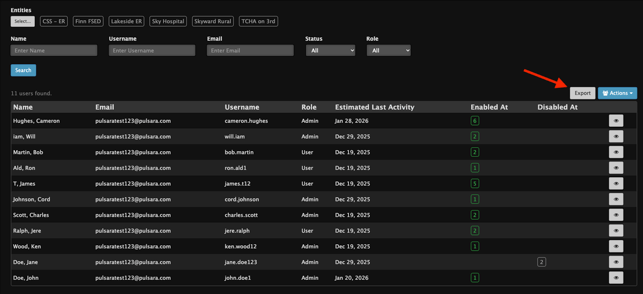
The export creates a .csv file from the list of users filtered in the current search results on the Manage Users screen.
The list of columns included in the new user export has changed slightly from what was included in the old user export. The new export includes the following fields:
User ID, Name, Email, Phone, Role, Estimated Last Activity, Entities, Status
Timing & Support
-
Release Date: This enhancement will be available starting on February 10th.
-
Resources: To learn more about user administration, see this article.