
Can Pulsara Integrate with our EHR?
Pulsara is a purpose-built communication and logistics platform, not a primary medical record or data documentation system. While Pulsara acts as a "digital thread" for real-time coordination, we recognize the potential need to move key data into your Electronic Health Record (EHR) for the permanent patient file.
Below are the two primary methods for integrating Pulsara with your EHR.
|
Feature |
Option 1: Manual PSR Upload |
Option 2: Programmatic Pulsara API |
|
Effort Level |
Low (Immediate) | High (Requires Dev Team) |
|
Cost |
Included in all packages | Requires a paid Pulsara package (not available for Pulsara ONE users) |
|
Method |
Manual Download/Upload | Custom Code/Automated |
|
Outcome |
Full Pulsara Summary Report (PSR) | Custom field mapping or auto-attach |
Option 1: Manual Summary Upload (Available Now)
The most common and immediate way to document Pulsara activity in the EHR is via the Pulsara Summary Report (PSR).
- Workflow: Once a patient case is closed, or at a designated time within the patient channel, a Pulsara User manually downloads the PSR (PDF format) from the Pulsara web application.
- EHR Integration: The PDF is then uploaded directly into the patient’s Media File (or other applicable area) within the EHR.
- Best For: Entities looking for a no-cost, immediate solution without involving hospital IT resources.
Option 2: Custom Integration via Pulsara API
For entities desiring an automated "hands-off" workflow, the Pulsara API allows your organization’s internal development team to build a bespoke connection between Pulsara and the EHR.
- How it Works:
- The Trigger: A specific event (such as entering an MRN or CSN into a Pulsara Config ID field) triggers the integration.
- The Action: Your system calls the Pulsara API to "Get Patient Data."
- The Result: Your developers can map specific data fields directly into the EHR flowsheets or programmatically pull the PSR and attach it to the Media File.
- Requirements:
- Requires a Pulsara UNITED contract tier.
Requires internal development resources from the customer’s IT/Software team to write and maintain the integration code.
Why doesn’t Pulsara "Auto-Sync" everything?
A common question is why Pulsara doesn't automatically push every data point into the EHR. It is important to distinguish between Communication and Documentation:
- Communication vs. Record: Pulsara captures rapid-fire team coordination, including team messages, notifications, and clinical updates. Much of this information is vital for the moment but is not intended—and often not desired—for the permanent legal medical record.
- Clinical Privacy: Most health systems prefer to vet which specific data points (like timestamps or specific communications) enter the EHR.
Customer Control: A custom API integration (Option 2) ensures your clinical informatics team maintains 100% control over exactly what data is written into your EHR and where it lives.
Next Steps for Your IT Team
If you are interested in exploring Option 2 (Pulsara API), please ensure you have a UNITED contract in place and have confirmed the availability of your internal development team. Pulsara provides the API documentation, but the development and mapping within the EHR are managed by the customer entity. Reach out to help@pulsara.com if you have any questions or are interested in obtaining the API User Guide.
Technical Note on Scope
Pulsara Support and Product teams provide documentation for the Pulsara API but do not write custom code or perform mapping services for customer EHR environments.
Appendix A - Sample Code
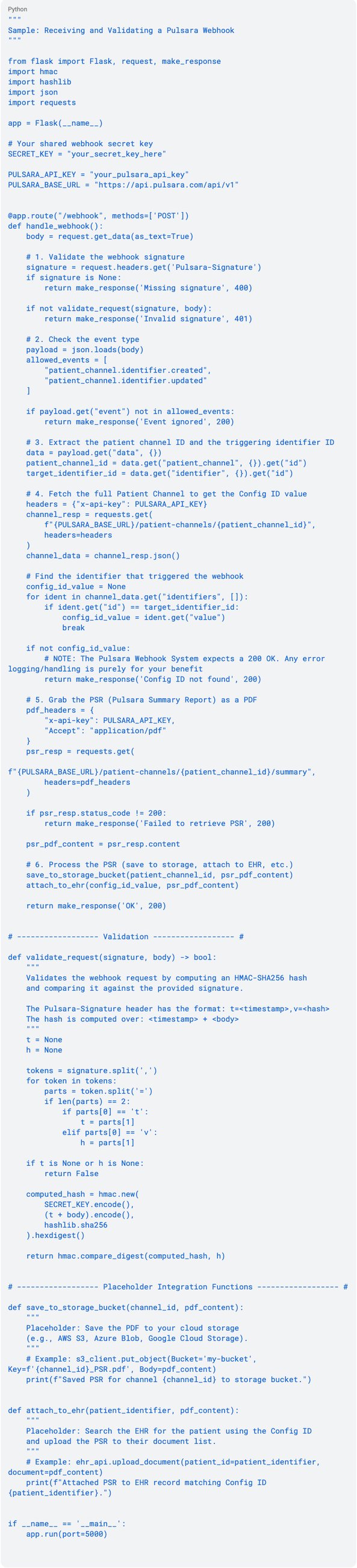
Because Pulsara webhook payloads are kept intentionally minimal for security and privacy, the incoming webhook will contain the internal id of the Configurable ID (Identifier) but not its actual value. Therefore, the workflow requires an additional step to query the Patient Channel API to extract the matching string value before pulling the Pulsara Summary Report (PSR) PDF.
NOTE: This is example code only. You should not copy and paste this code directly into any application without full vetting and validation from your development team. Use at your own risk.
Webhook Workflow Example for fetching PSR (Python)
Key Technical Details:
-
Minimal Payloads: The patient_channel.identifier.updated payload only includes the ID, name, and category of the identifier. An API call to GET /api/v1/patient-channels/<id> is mandatory to read the actual value (like the MRN or account number) entered by the user.
-
Validation of the Pulsara-Signature: Validating the Pulsara-Signature header ensures that the incoming request came from Pulsara.
-
PSR Headers: When calling GET /api/v1/patient-channels/<id>/summary, the request will fail if the Accept: application/pdf header is not included.
-
Trigger Events: The example listens for both .created and .updated events. If a user creates a new patient channel and adds the identifier at the exact same time, a patient_channel.identifier.created event is fired, which is why handling both is recommended for this workflow.