
Update Summary:
Patient lists across Pulsara Web and Mobile have been improved to display more information, provide better filtering, and use updated/consistent verbiage.
Patient List Changes for Mobile
What’s New
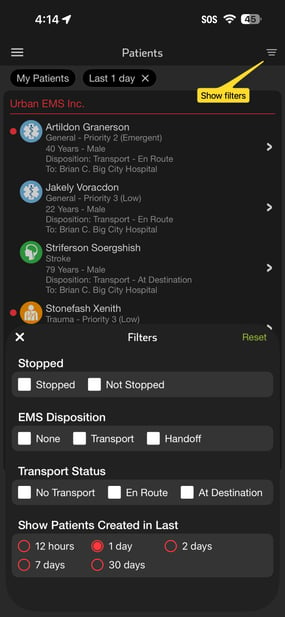
- Single Screen Display: Patient list has been updated to display all patients in a single screen, eliminating the previous multi-tab view
- Alert Indicators: Patients now appear with a red dot if there is an unacknowledged alert for the patient
- Expanded Patient Details: The new patient list displays more information for each patient including EMS Acuity, Transport Status, and Destination
- A patient displays as “At Destination” if either the receiving facility sets “ED Arrival” or EMS sets “At Destination”
- Updated Transport Status Labels: New Transport Status labels more clearly capture transport information: “En Route” or “At Destination”
- Enhanced Filtering Capabilities: New filtering was added to restrict the list based on stopped status, transport status/type, and creation time
- Stopped Patient Display: Stopped patient display is no longer controlled by the facility setting “Hours to Display Stopped Patients.”
- New filters allow showing stopped patients created in the last 12 hours, 1 day, 2 days, 7 days, 30 days
Updated Mobile Patient List New List Filters

Who’s impacted
- Anyone who views patient list in Pulsara Mobile
- Team members who want to filter patients based on Stopped status, EMS Acuity, Transport Status
Timing
- This change will be available in Pulsara Mobile 73 on June 24th
Helpful Resources
- Knowledgebase article
Patient List Changes In Web
What’s New
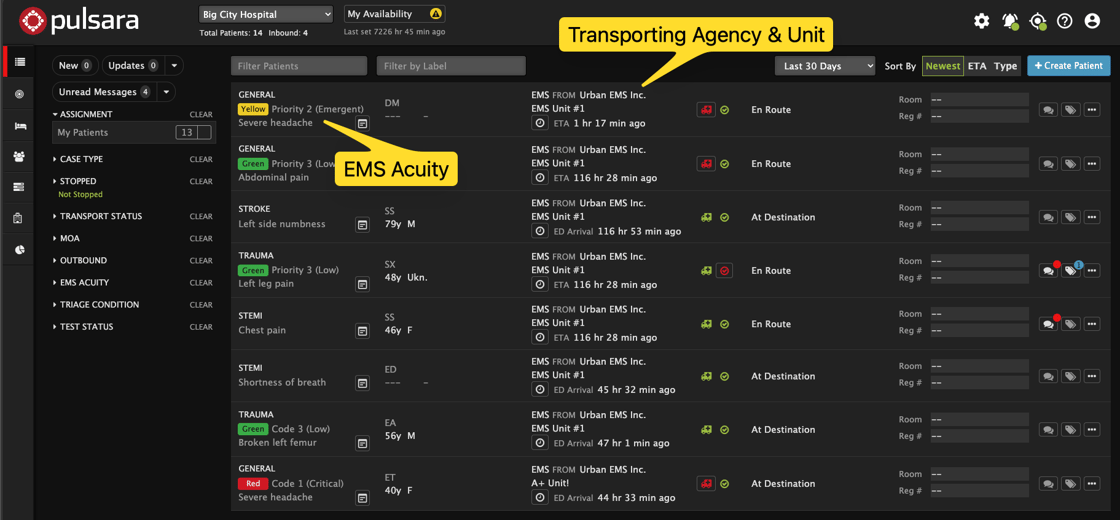
- EMS Acuity & Unit: The patient list for facility users has been updated to display patients created by EMS with EMS Acuity as well as transporting Agency & Unit
- Acuity displays as a color chip indicating the severity of the acuity along with acuity name and NEMSIS code.
- For example: “Red Code 1 (Critical)”
- Additional Filtering: New list filters show patients based on:
- Stopped Status
- Transport Status
- EMS Disposition (ems only)
- EMS Acuity
Facility view of Patient List
Who’s impacted
- Anyone who views the list of patients in Pulsara Web
- Team members who need to filter patients based on their job function
Timing
- This change will be available in Pulsara Web on June 23rd
Helpful Resources
- Knowledgebase article
Join the Pulsara Facebook User Group
Looking for tips, best practices, product updates, and conversations with other Pulsara users? Join the Pulsara Facebook User Group to connect with peers, share ideas, ask questions, and stay up to date on what's new in Pulsara.