The June 2026 update includes four key changes:
- Introduction of Narrative / Notes
- Updates to Chief Complaint field usage
- Full release of Pulsara Intelligence
- Improved User Management for Admins
The new Narrative / Notes feature changes how patient information is captured, particularly affecting the Chief Complaint field and your day-to-day use of Pulsara. Not to worry, we’ve got your back.
We have implemented these changes in a way that guides usage of the features, directly in the app. And, with the addition of Pulsara Intelligence, the detailed information in Narrative / Notes can be used to more quickly create patient channels that contain more structured data. Read on to learn about these exciting features!
Narrative / Notes
What’s New
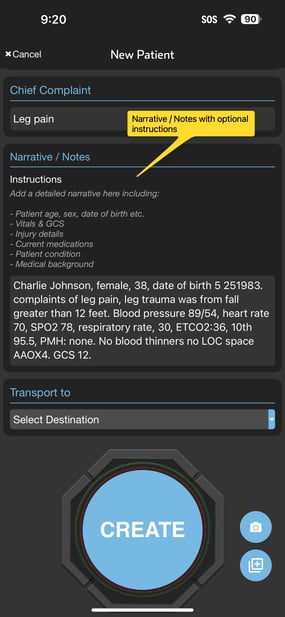
- Detailed Patient Information: Narrative / Notes gives teams a dedicated place for capturing details like medical history, radio report information, vitals, labs, patient condition, and other relevant notes
- Ownership and Editing: The feature provides control over patient narrative ownership. All users from any organization on the channel can view any narrative, but only users whose organization added a particular narrative can edit it
- Narrative Instructions: This feature adds the ability to display patient type-specific guidelines for what should be included in the narrative.
- Requirement: This field is required whenever creating a patient in Pulsara (outside of an incident)
UPDATES to Chief Complaint
- Focus on Primary Concern: Chief Complaint is now only for a short primary concern like "chest pain" or "abdominal pain."
- Field Renaming and Visuals: The field was renamed from “Chief Complaint / Notes” to “Chief Complaint” and made visually smaller to convey its new intended use.
- Usage: Chief Complaint is no longer required for any patient type, but adding this information is highly recommended
- Character Limit: The field now accepts a maximum of 255 characters

Who’s impacted
- Anyone who creates or updates patient channels using Pulsara Mobile or Pulsara Web
- Team members who input or read the chief complaint and/or patient narrative information
Timing
- This change will be available in Pulsara Web on June 2nd
- This change will be available in Pulsara Mobile 72 on June 3rd
Helpful Resources
- For a detailed overview of these changes and an overview video, follow the links below:
- EMS users
- Facility users
- Knowledge Base Article
Pulsara Intelligence
What’s New
- A ground breaking feature that extracts patient data from a Narrative / Note and transforms it into structured data
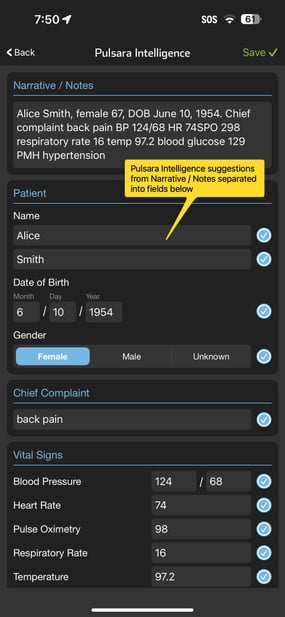
- Extracted Data: The following information can be extracted from a Narrative / Note if it is present: Name, Age, Gender, DOB, Vitals, Condition, Chief Complaint
- Suggestions: Extracted data will appear as suggestions in individual fields on the mobile new patient screen and can be saved after it is verified as accurate.


Why this change?
- Efficiency: Faster and easier patient creation
- Data Quality: Helps create patient channels with more structured data, aiding downstream teams in making informed care decisions
Who’s Impacted
- Anyone who creates patient channels using Pulsara Mobile
- Teams that look at patient information for active patient care
- Integration partners (ePCR) who consume patient information from Pulsara
Rollout/Configuration
- This feature is available to all customers, but is off by default. Admins may enable this feature by turning on the “Enable Pulsara Intelligence” setting for their organization
Timing
- Release Date: The feature will become available starting June 3rd.
Helpful Resources
- For a detailed overview of Pulsara Intelligence including an instructional video, please go here.
- Knowledge Base article
Improved User Management for Admins
What’s New
- The Pulsara Web admin screen for viewing and updating User Accounts has been improved
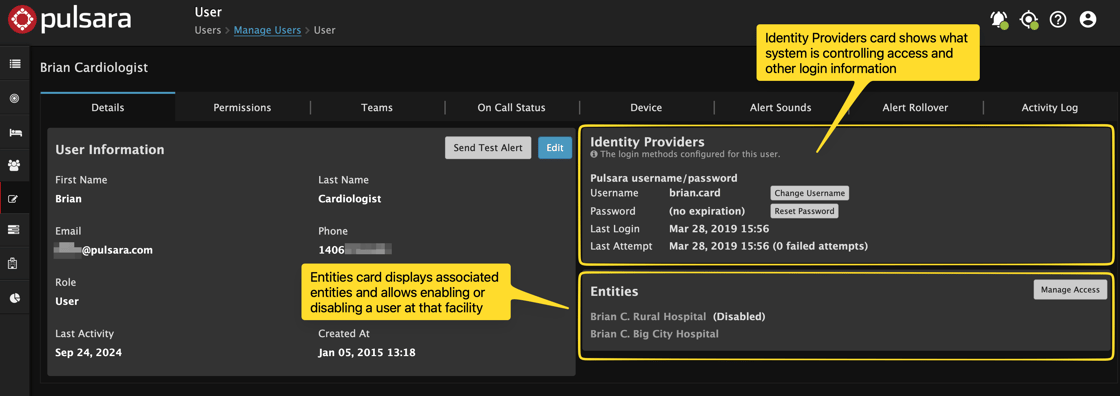
- Identity Providers Card: A new card displays consolidated login information and what system is controlling access to Pulsara.
- Either Pulsara itself or an external identity provider.
- Entities Card: This card shows a user’s associated facilities and whether they are disabled at a facility. A new Manage Access button makes it easy to change the enabled/disabled state for a user at their facilities.
Who’s Impacted
- EMS Organization Admins or Facility Admins who view and edit user account details related to login, identify provider information, and associated entities
Timing & Support
- Release Date: This improvement was released on May 19.
- Resources: To learn more about user administration, see this article.